WordPress AI Plugins: What to Check Before You Install One
A WordPress AI plugin connects your site to an AI service so it can write, answer chats, tag images or take actions for you. Before you install one, check where it keeps your API key, what the usage bill will be, what data it sends out, how often it gets security fixes and whether it slows your pages. On our WordPress care plans, a person checks every plugin update, AI plugins included.
You have seen the buttons. Write this post. Answer my visitors. Fix my alt text. AI plugins promise all of it, and many are free to install.
What the plugin page does not show is the key it stores, the bill that shows up later and the updates it will need. We keep WordPress sites running for small businesses, and we build two AI plugins of our own. This guide covers what AI plugins do, the checks to run before you install one and how to keep it safe after.
What do WordPress AI plugins do?
Most AI plugins do one of five jobs. Each one sends something from your site to an AI service and brings an answer back.
| Job | What it does | What to watch |
|---|---|---|
| Writing and editing | Drafts posts, titles, excerpts and alt text in the editor | Every click is a paid request |
| Chatbots | Answers visitors on your site | Visitor messages go to the AI service |
| Images | Creates or edits images | Large image files can slow your pages |
| Search | Smarter search on your own site | Your content is sent out to be read |
| Agents | Lets outside AI tools take actions on your site | Needs tight permissions and a log |
The AI plugin from the WordPress Core AI team turns nothing on by default. You pick each feature in Settings > AI. Its experiments can change or be removed, so the team suggests trying them on a staging site first (WordPress.org, November 2026).
Where does the plugin keep your API key?
Most AI plugins need an API key from an AI service. Treat that key like a credit card: anyone who gets it can run up your bill.
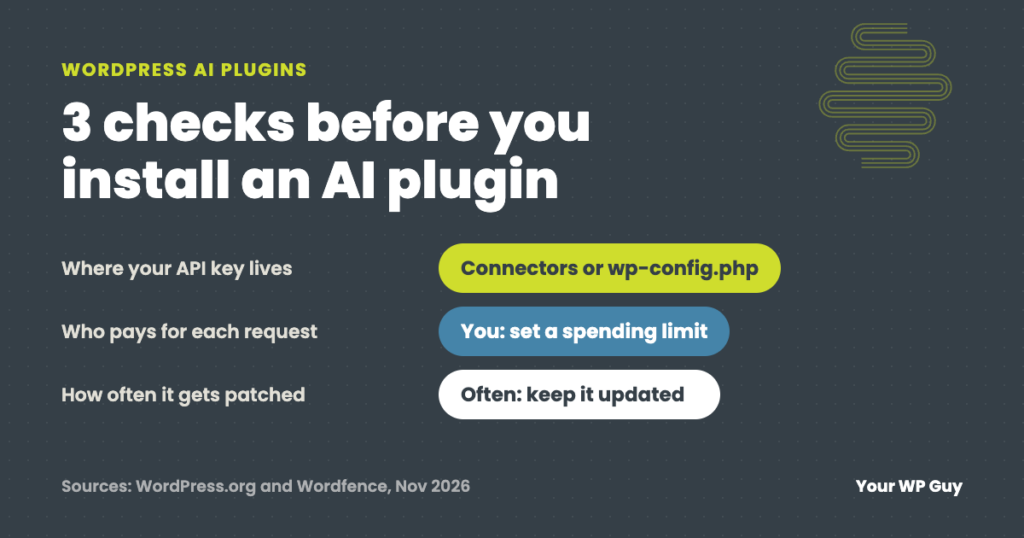
Since WordPress 7.0 (May 2026), there is one place for these keys: Settings > Connectors. Plugins that use it do not need their own copy of your key.
A key saved on that screen sits in your database. WordPress’s own developer notes say keys in the database are not encrypted. They are only hidden on screen. A safer spot is your wp-config.php file, which WordPress checks first.
define( 'OPENAI_API_KEY', 'paste-your-key-here' );Add that line above the line that starts with /* That's all, stop editing! The name follows your AI service, like OPENAI_API_KEY for the company behind ChatGPT or ANTHROPIC_API_KEY. If your host gives you a secure place for environment variables, use that instead. WordPress checks it before anything else.
Using an AI plugin from before WordPress 7.0?
Older plugins may keep their own copy of your key in the database. Ask the developer where it is stored, or check whether the plugin can use Connectors now.
What does an AI plugin cost to run?
The plugin may be free, but the AI is not. Most AI services bill for each request, based on how much text goes in and comes out.
Two things surprise people. First, the bill goes to your account with the AI service, not to the plugin. Second, some features run on their own. In the official AI plugin, for example, comment moderation checks every new comment, including comments from visitors. Each check is a request.
Before you connect anything, set a monthly spending limit in your AI service’s dashboard. Then a busy month costs what you planned, not more.
What data leaves your site?
Whatever the feature works on goes to the AI service: your drafts, your visitors’ chat messages, comments or images. That is how the AI reads it.
Before you turn on a chatbot or an automatic feature, read what it sends. In the official AI plugin, the info icon next to each feature shows when it runs, what it sends and how many requests it makes.
Keep customer details out of AI features you have not checked. If visitors’ messages go to an AI service, your privacy policy should say so. How to word that is a question for your own lawyer.
Are AI plugins a security risk?
They carry the same risk as any plugin, and they get fixed often. Between late July and early November 2026, Wordfence logged 20 security flaws in AI Engine, a popular AI chatbot plugin with 90,000 installs. Five were rated 7 or higher out of 10. All 20 were patched.
A fix only helps sites that update. The risky AI plugin is the one somebody installed, tried once and forgot.
Plugins that let outside AI tools act on your site need the most care. You will often see them called MCP plugins. Give that connection its own user with only the access it needs, keep a log of what it does and try it on a staging copy first.
7 checks before you install an AI plugin
- Check that it is maintained. On its WordPress.org page, look at Last updated, the WordPress version it is tested up to and whether support questions get answers.
- Find where the key goes. Prefer plugins that use Settings > Connectors or a
wp-config.phpline over a plain text field. - Set a spending limit first. Do it in your AI service’s dashboard before you paste in a key.
- Read what it sends. Turn off anything that runs on its own unless you need it.
- Try it on a staging copy. Your host or a staging plugin can make one. Test the feature there, not on your live site.
- Check your speed before and after. Test the same page both times so the numbers compare.
- Keep it updated, or remove it. If you stop using it, deactivate and delete it, then delete the key at the AI service.
Rather have someone check it for you?
Ask us before you install an AI plugin. Plan clients hear back within an hour.
- Talk to a WordPress expertTell us which AI plugin you want and what you want it to do.
- We look it over with youHow often it is updated, where it keeps the key and what it sends out.
- You use it, and we keep it updatedA person checks every plugin update on your site, the AI one included.
Why we built our own AI plugins to use your keys
We make two AI plugins: RatioScribe, which writes posts, and Extract Yeti. Both use the site owner’s own AI keys. With RatioScribe, the AI service bills the owner directly, and we add no markup. On WordPress 7.0 and newer, RatioScribe can use the Connectors screen, so it does not need its own copy of the key at all. That is what we would look for in any AI plugin: your key, your bill, your limit.
Not sure what is already running on your site? Our free Uh Oh Score checks your site and shows what to fix first, with no sales call required.
Get my Uh Oh ScoreQuestions people ask
Are AI plugins for WordPress free?
Many are free to install, but the AI behind them is not. Most AI services bill your own account for each request. Set a monthly spending limit in the AI service’s dashboard before you connect a key.
Do AI plugins slow down WordPress?
They can. Most AI work happens on the AI service’s servers after you click a button, so you feel it in the editor more than your visitors do. Chatbots and features that load on every page add weight, so test the same page before and after.
Is it safe to give an AI plugin my API key?
It can be. Use Settings > Connectors or a line in wp-config.php instead of a plain plugin field, set a spending limit and delete the key at the AI service if you remove the plugin.
Does WordPress have AI built in?
Partly. Since WordPress 7.0 (May 2026), WordPress has a built-in way to connect to AI services and a Connectors screen for keys. The AI features themselves still come from plugins, like the official AI plugin from the WordPress Core AI team.
What is an MCP plugin?
It lets outside AI tools read your site and take actions on it, like editing a post. Give it its own user with only the access it needs, keep a log and try it on a staging copy first.
I asked ChatGPT to set up an AI plugin for me. Isn’t that enough?
It can be, if you have the time. It will hand you the steps: get a key, set a limit, test on staging, check your speed, keep it updated. Count your time, too. If an hour of it is worth $75, 2 hours of setup and testing is $150, more than our $119 Gold plan.
Sources
- WordPress.org News, WordPress 7.0 “Armstrong”, May 2026.
- Make WordPress Core, Introducing the Connectors API in WordPress 7.0, checked November 2026.
- WordPress.org, AI plugin by the WordPress Core AI team, checked November 2026.
- Wordfence, AI Engine vulnerability list, checked November 2026.
Use AI on your site without the worry.
On a care plan, a person checks every plugin update before and after it goes live, AI plugins included.

Jonathan Wofford is the founder of Your WP Guy, a WordPress care and maintenance service supporting 105+ active client sites. He and his team keep WordPress sites fast, secure, and running, so business owners can stay focused on their business instead of their website.