Best WordPress Migration Plugins: What We Use and When Each Fits
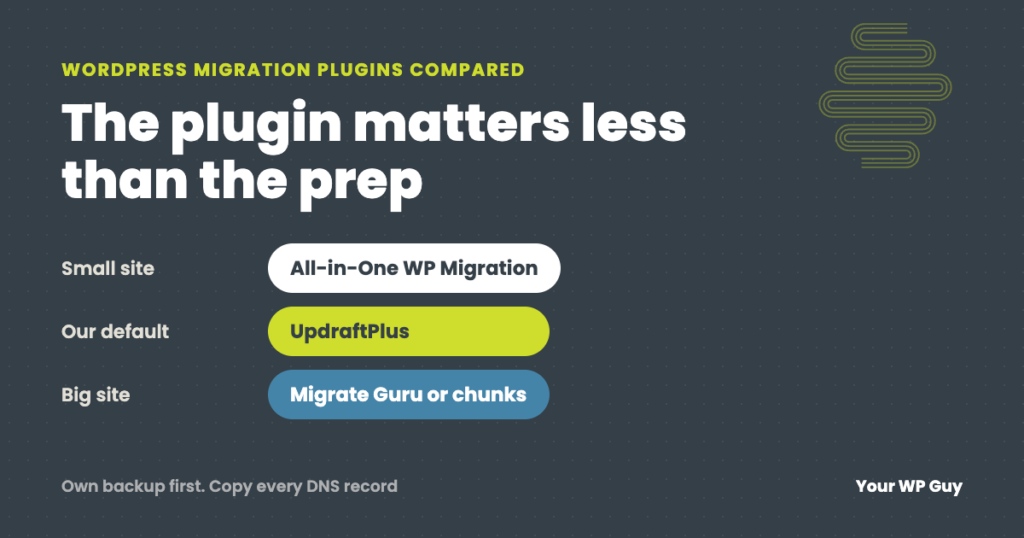
For most sites, use a backup plugin you already trust, and test the move before you switch. We have used all six plugins below on client moves, and UpdraftPlus is our default because it works most consistently. All-in-One WP Migration is simplest for small sites, Duplicator suits moves to an empty server, and Migrate Guru handles big sites on shared hosting. The plugin matters less than the prep: your own backup first, the new host’s upload and time limits, and email and DNS. Or let us do it: our WordPress migration service is $250 per site.
Last verified: October 2026. We sell a migration service. We are not affiliated with any plugin below and earn nothing if you use one.
Every WordPress migration plugin promises a one-click move. Most of the time they deliver. When they do not, the move stops halfway, the new site is missing images, or email quietly breaks because nobody copied the DNS records.
We move client sites between hosts all the time. This guide compares the migration plugins people search for most, says which situation each one fits, and covers the problems that break moves no matter which plugin you pick.
The migration plugins compared
| Plugin | Free version | Watch out for | Best for |
|---|---|---|---|
| UpdraftPlus | Moves a site by backup and restore, with a built-in address replace | Free moves are download then upload; direct site-to-site needs Premium | Most sites. Our default: the most consistent for us. |
| All-in-One WP Migration | Exports the whole site as one file and imports it on the new site | Imports are capped by the new host’s upload limit unless you buy the Unlimited Extension | Small sites and quick copies |
| Duplicator | Builds a package plus an installer; the new host does not need WordPress installed | Multisite needs Pro; you move the files to the new server yourself | Moving to an empty server, developers |
| Migrate Guru | Copies the site through its own servers using a migration key | 5 migrations a month; no local sites; it is not a backup | Big sites (up to 200 GB) on shared hosting |
| WPvivid | Backs up and migrates, including to a new domain | Moving through cloud storage needs Pro | A free all-in-one backup and migration plugin |
| WP Migrate Lite | Exports the database with addresses replaced, and full-site ZIP exports | Pushing and pulling between two sites needs Pro | Developers syncing a database between copies of a site |
From each plugin’s WordPress.org page, checked October 2026. We have used all six on client moves; UpdraftPlus is the one we rely on.
Which plugin fits your site
- Choose UpdraftPlus if you want the one that works most consistently. It is our default after using all of these: you get your backup and your migration from one tool, and the free version is enough for most single sites.
- Choose All-in-One WP Migration if the site is small and you want the fewest steps. Check the new host’s upload limit first; it is shown on the import screen.
- Choose Duplicator if you are moving to a fresh server with nothing installed yet, or you are comfortable uploading files by SFTP.
- Choose Migrate Guru if the site is large and shared hosting keeps timing out. The heavy lifting happens on its servers, not yours. Take your own backup first, since it does not make one.
- Choose WPvivid if you want a free plugin that does backups and migration together and UpdraftPlus is not already installed.
- Choose WP Migrate if you are a developer moving databases between local, staging and live copies.
Whichever you choose, do not install three of them to see which works. Each one adds code, scheduled tasks and sometimes database tables. Pick one, and remove it after the move if it is not your backup plugin.
What about your host’s free migration tool?
Many hosts offer a free migration plugin or service. It is convenient, and sometimes it works fine. We stopped using them for client moves: they timed out partway, or left part of the uploads folder behind, which shows up as missing images weeks later.
If you do use one, check the media library and a sample of older posts on the new site before you switch DNS.
What breaks a migration, whatever the plugin
Upload and time limits on the new host
Plugins hit the limits of the server they run on: how big a file you can upload, how long a script can run, and how much memory it gets. On one move we handled, the new host’s upload limit was too low for even a 5 MB plugin. Ask the new host to raise the limits before you start, or use a plugin that works around them.
Very large uploads folders and databases
Big stores and media-heavy sites fail most often. We move those in chunks, the uploads folder and the database separately, so neither server is overwhelmed.
Address changes done the wrong way
If the domain changes, every old address in the database has to change too. Migration plugins handle this properly. A plain find-and-replace on the database file can corrupt settings that store their length alongside the text. Our guide to changing a WordPress domain covers this.
Email and DNS
No plugin copies your DNS records. If the domain’s DNS moves with the site, email records can be left behind and email stops arriving. Copy every record, not just the one that points to the website.
Orders placed during the move
On a store, any order placed on the old site after you copy it will not be on the new one. Put the store into maintenance mode for the move.
Rather have us move it?
Moving sites between hosts is everyday work for us: $250 for one site, host to host, with a domain change included.
- Talk to a WordPress expertTell us where the site is now and where it is going.
- We back it up and move itOur own backup first, then the move, with email and DNS records copied.
- We test before the switchPages, forms and checkout are checked on the new host before anyone sees it.
How we move a site
Our process, and why
- Our own backup first. We never rely on the host’s backup for a move. Too many host backups have failed when we needed them.
- UpdraftPlus first. It handles most sites. If a restore times out or an archive will not open, we copy the files and database by hand instead.
- Big sites in chunks. Uploads and database go across separately, so the new server is not overwhelmed.
- Monday to Thursday only. We do not start a move on a Friday or a weekend.
- The old host stays live for a week. If anything was missed, it is still there to copy.
- Stores go into maintenance mode during the move, so no order lands on the old site.
None of that depends on which plugin you use. It is what makes the plugin’s one click actually work.
For the full step-by-step move, from checking the new host to switching DNS, see our guide to migrating a WordPress site to a new host.
Moving because the site is slow or acting up? Our free Uh Oh Score checks your site and shows what to fix first, with no sales call required.
Get my Uh Oh ScoreQuestions people ask
What is the best WordPress migration plugin?
It depends on the site. We have used all the major ones, and UpdraftPlus is our default because it works most consistently and is also our backup plugin. All-in-One WP Migration is simplest for small sites, Duplicator suits moves to an empty server, and Migrate Guru handles large sites on shared hosting.
Is All-in-One WP Migration free?
The plugin is free, but imports are limited by your host’s upload size. Bigger sites need the paid Unlimited Extension, or a host that raises the limit.
Can UpdraftPlus migrate a site for free?
Yes. You back up the old site, upload the backup to the new one and restore it, and it replaces the old addresses. Premium adds a direct move from the old site to the new one.
Do I need WordPress installed on the new host first?
For most plugins, yes: you install WordPress and the plugin, then import. Duplicator is the exception; its installer sets the site up on an empty server.
Will a migration plugin move my email?
No. Email lives in your DNS records and with your email provider. Copy every DNS record to the new provider if your DNS is moving too.
Why did my migration stop partway?
Usually the new or old server’s limits: upload size, script time or memory. Ask the host to raise them, move the site in smaller pieces, or use a plugin that runs the copy on its own servers.
Should I delete the migration plugin afterward?
If it is not your backup plugin, yes. Remove it and any leftover export files, since a full-site export left on the server can sometimes be downloaded by anyone who finds it. We have found multi-gigabyte backup files sitting in reachable folders on sites we took over.
Sources
- WordPress.org, UpdraftPlus.
- WordPress.org, All-in-One WP Migration and Backup.
- WordPress.org, Duplicator.
- WordPress.org, Migrate Guru.
- WordPress.org, WPvivid Backup and Migration.
- WordPress.org, WP Migrate Lite.
Move your site without losing email or orders
We back it up, move it, copy every DNS record and test it on the new host before the switch. $250 for one site, host to host.

Jonathan Wofford is the founder of Your WP Guy, a WordPress care and maintenance service supporting 105+ active client sites. He and his team keep WordPress sites fast, secure, and running, so business owners can stay focused on their business instead of their website.