How to Create a WordPress Plugin (With the Security Checks Most Guides Skip)
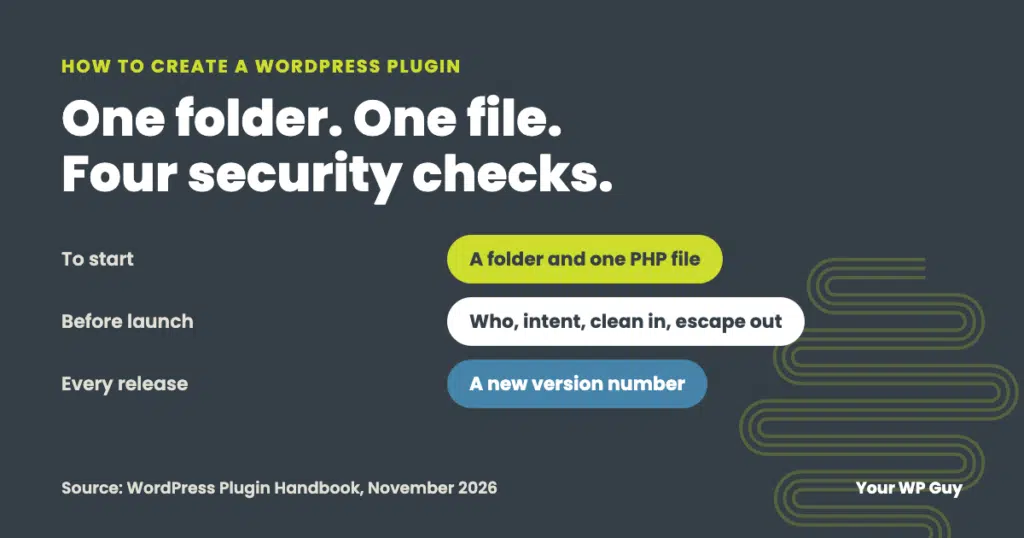
To create a WordPress plugin, make a folder in wp-content/plugins, add a PHP file with a header comment that names the plugin, and hook your code into WordPress with an action or a filter. Then activate it under Plugins. Build and test it on a copy of your site first. If you would rather not code it yourself, we offer custom WordPress plugin development from $499.
You need your site to do one thing no plugin quite does. Maybe it is a small change you keep pasting into your theme, or a feature you have described to ChatGPT and now have a block of code for. Either way, you want it in a plugin that stays put when you change themes.
We build and run our own WordPress plugins and look after custom ones on client sites. This guide walks through the real steps, shows working code, and covers the parts most tutorials skip: the security checks, version numbers and what happens after launch.
What you need before you start
You need a copy of WordPress to break safely, a code editor and some PHP. You do not need to touch your live site until the very end.
- A test site. A local WordPress install on your computer, or a staging copy of your site from your host.
- A code editor. Any editor that shows PHP clearly works.
- Error messages turned on. On the test site only, add
define( 'WP_DEBUG', true );towp-config.phpso PHP errors show up instead of failing quietly. - A little PHP. Enough to read a function and change it. The WordPress Plugin Handbook covers the rest.
How to create a WordPress plugin, step by step
A plugin is a PHP file with a special comment at the top. WordPress reads that comment and lists the plugin on the Plugins screen.
- Pick a name and a prefix. Choose a plugin name and a short, unique prefix for everything you create, such as
mysite_. WordPress recommends a prefix of at least 4 letters (5 is better) so your code never clashes with another plugin. - Make the folder. On your test site, create
wp-content/plugins/mysite-tweaks/. - Add the main file. Inside it, create
mysite-tweaks.php. Only the plugin name is required in the header, but a description and version help later. - Block direct access. Add the
ABSPATHcheck so nobody can load the file on its own in a browser. - Add your code. Hook a function into WordPress (the example adds a line under every blog post).
- Activate and test. Go to Plugins > Installed Plugins, click Activate, then open a post and check for errors.
Here is a complete, working plugin. Save it as mysite-tweaks.php:
<?php
/**
 * Plugin Name: My Site Tweaks
 * Description: Small changes for this site.
 * Version: 1.0.0
 */

if ( ! defined( 'ABSPATH' ) ) {
    exit; // Stop if someone opens this file directly.
}

function mysite_thanks_line( $content ) {
    if ( is_single() ) {
        $content .= '<p>Thanks for reading.</p>';
    }
    return $content;
}
add_filter( 'the_content', 'mysite_thanks_line' );
When you are ready to move it to your real site, zip the folder (not just the file) and upload it under Plugins > Add New Plugin > Upload Plugin. Take a backup first.
Actions and filters, in plain words
Hooks are how a plugin plugs in. WordPress pauses at set points while it builds a page and lets your code join in.
- An action runs your code at a moment, such as when a post is saved or the footer loads. You attach it with
add_action(). - A filter changes something on its way to the screen or the database, such as a post’s text or title, and hands it back. You attach it with
add_filter(). The example above is a filter.
Plugins can also run code once when they are turned on, turned off or deleted. That is where you create or remove anything the plugin stores, so it does not leave clutter behind.
The security basics every plugin needs
Most plugin security problems come from four missed checks. Any plugin that has a form, a settings page or a button needs all four.
| Check | What it stops | WordPress function |
|---|---|---|
| Who is allowed | A logged-in subscriber changing settings meant for admins | current_user_can() |
| Did they mean it | A trick link that makes an admin’s browser submit a form | wp_nonce_field() and check_admin_referer() |
| Clean what comes in | Junk or code saved into your database | sanitize_text_field(), absint() |
| Escape what goes out | Scripts injected into the page your visitors see | esc_html(), esc_attr(), esc_url() |
Function names from the WordPress Plugin Handbook, November 2026.
In a plugin, saving one setting from a form looks like this:
// In the form:
wp_nonce_field( 'mysite_save', 'mysite_nonce' );

// When the form is saved:
if ( ! current_user_can( 'manage_options' ) ) {
    wp_die( 'Not allowed.' );
}
check_admin_referer( 'mysite_save', 'mysite_nonce' );
$color = sanitize_text_field( wp_unslash( $_POST['mysite_color'] ?? '' ) );
update_option( 'mysite_color', $color );

// When you show it:
echo esc_html( get_option( 'mysite_color' ) );
Before launch, run the free Plugin Check plugin from WordPress.org on your test site. It flags security, performance and accessibility problems, and WordPress.org says it is worth running even if you never publish your plugin there.
Can AI write the plugin for you?
Yes, for small plugins. ChatGPT or Claude can write a working first draft of a plugin like the one above in seconds, and that is a fine way to start if you have the time to check it.
In a chat window, the AI only sees what you paste in, so you run each step and tell it what happened. AI code can work on the first try and still miss one of the four security checks above, because nothing in a quick test shows the gap. Before AI-written code goes live, check it for those four, run Plugin Check, and test it on a copy of your site with WP_DEBUG on.
We use AI the same way. AI works alongside our team, Jonathan checks the work, and every change goes through checks on top of checks.
What happens after you launch it
A plugin is not done at launch. WordPress, PHP and your other plugins keep changing, and your plugin has to keep up.
- Change the version number every time the code changes. WordPress compares version numbers to decide whether an update is available. Two different builds with the same number means some sites never get the fix.
- Test it against new WordPress and PHP versions on your test site before your live site gets them.
- Keep a backup before every update, so a bad release costs you minutes, not a day.
- Write down what it does. A short note on what the plugin changes and where its settings live saves the next person (or you, in a year) a lot of digging.
Rather have someone build it?
We build custom WordPress plugins for small businesses, test them on a copy of your site, and you own the code.
- Talk to a WordPress expertTell us what you need the site to do. We quote it before we start, and small builds start at $499.
- We build it on a copyYour live site keeps running while we work, and every plugin gets a security review before launch.
- We keep it workingIf you want it kept current with new WordPress releases, plugin maintenance starts at $199 a month.
Real example: the fix that never arrived
In August 2026, one of our own Beaver Builder plugins briefly had two different builds with the same version number, 2.3.0. One of them had a broken fix for a scrolling text ticker. Because WordPress update checks compare version numbers, a site that already held the first 2.3.0 would never be offered the corrected one.
We shipped the correction as 2.3.1 so every site would pick it up. Since then the version number changes before every rebuild, even for a same-day fix.
Not sure what your current plugins are doing to your site? Our free Uh Oh Score checks your site and shows what to fix first, with no sales call required.
Get my Uh Oh ScoreQuestions people ask
How can I create my own plugin?
Create a folder in wp-content/plugins, add a PHP file with a header comment that includes the plugin name, hook your code in with add_action() or add_filter(), and activate it under Plugins. Build and test it on a copy of your site before it goes live.
Is it free to make a WordPress plugin?
Yes. WordPress, the Plugin Handbook and tools like Plugin Check are free. The cost is your time, or a developer’s time if you hire one. Small custom builds from us start at $499.
Can I use ChatGPT to write a WordPress plugin?
Yes, for small plugins. A chat window only sees what you paste in, so check its code for the security basics, run Plugin Check and test on a copy of your site before it goes live. AI tools can also connect to the site and make changes themselves, but someone who knows WordPress has to set them up safely and check every change they make.
Should I put my code in functions.php or a plugin?
Use a plugin for anything that should survive a theme change. Code in your theme’s functions.php disappears when you switch themes, and a theme update can wipe it unless you use a child theme.
Do I need to know PHP?
Some. You should be able to read a function and change it, and know where to look when an error shows up. For anything with forms or payments, it pays to have someone experienced review it.
How do I update my plugin later?
Change the code, raise the version number in the header, test it on your copy, take a backup, then upload the new version. Never ship two different builds under the same version number.
Sources
- WordPress.org, Plugin Handbook: Plugin Basics.
- WordPress.org, Plugin Handbook: Header Requirements.
- WordPress.org, Plugin Handbook: Best Practices.
- WordPress.org, Plugin Check.
A plugin that does exactly what you need
We build it on a copy of your site, review it for security before launch, and keep it current if you want us to. You own the code.

Jonathan Wofford is the founder of Your WP Guy, a WordPress care and maintenance service supporting 105+ active client sites. He and his team keep WordPress sites fast, secure, and running, so business owners can stay focused on their business instead of their website.