Is WordPress Secure? The Real Security Issues and How Sites Get Hacked
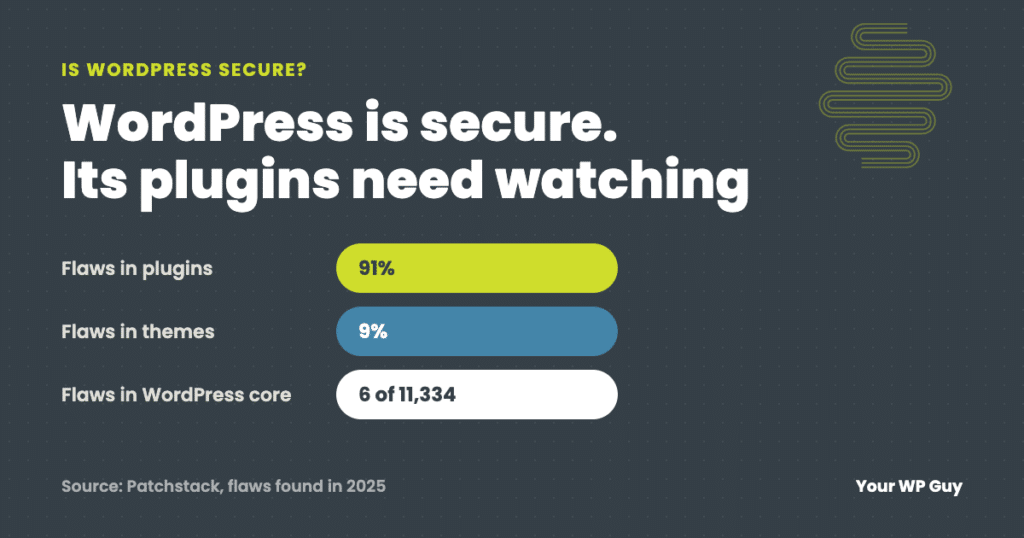
Yes, WordPress itself is secure: only 6 of the 11,334 WordPress security flaws found in 2025 were in WordPress core, all low priority. The real security issues are plugins (91%) and themes (9%), weak logins, and updates that wait too long, because attacks on a new flaw often start within hours, and AI is making them faster. Keep everything updated, remove what you do not use, and protect your logins, or let our WordPress security services handle it.
If you have heard that WordPress “gets hacked all the time,” you are not wrong about the headlines. But the reason is not WordPress itself. It is what gets added to it, and what gets left alone for too long.
This guide explains where WordPress security issues really come from, what attackers do once they get in, why the timing of updates matters more than most owners realize, and the short list of habits that prevents nearly all of it.
Is WordPress secure?
WordPress core is secure and well maintained. It has a dedicated security team, and minor security releases install automatically on most sites. The numbers from Patchstack, which tracks WordPress vulnerabilities, make the point:
| WordPress security flaws found in 2025 | Number | Share |
|---|---|---|
| In plugins | About 10,300 | 91% |
| In themes | About 1,000 | 9% |
| In WordPress core | 6, all low priority | Less than 0.1% |
| Total | 11,334 (up 42% from 2024) | 100% |
Source: Patchstack, State of WordPress Security in 2026. Plugin and theme counts are rounded from Patchstack’s percentages.
So the honest answer is: WordPress is secure, but a WordPress site is only as secure as its plugins, its theme, its logins and how quickly someone applies updates.
Where WordPress security issues come from
Nearly every hacked WordPress site traces back to one of these five things.
1. Plugins that are out of date
Most sites run 20 or more plugins from different developers, and each one is code that can have a flaw. When a flaw is found and fixed, the fix only protects you once the update is installed. Until then, your site is running code with a published hole in it.
2. Plugins nobody maintains anymore
Some plugins are abandoned by their developers. They never get a fix, so a flaw in them stays open for good. Patchstack found that 46% of the flaws disclosed in 2025 had no fix available from the developer when they were made public. Read more about abandoned WordPress plugins.
3. Themes, especially bundled ones
Themes are code too, and many premium themes bundle extra plugins that do not update through the normal dashboard. Those bundled copies are easy to forget and often fall far behind.
4. Weak or shared logins
Reused passwords, no two-factor sign-in, and old accounts for people who left the company all give attackers a way in without any flaw at all. Automated tools try leaked passwords against WordPress logins around the clock. See brute force attacks: what you need to know.
5. The server and hosting
Outdated PHP versions, weak file permissions, and sites that share a server with neglected sites can all expose yours. Your host protects the server; someone still has to protect what runs on it. Our guide to how WordPress security layers work together shows where hosts stop.
What attackers do once they get in
Most attacks are automated and not personal. The goal is usually to use your site, not to target your business. Here is what that looks like:
| What they do | What it means | What you might notice |
|---|---|---|
| Plant a backdoor | Hidden code or a hidden admin account that lets them back in | Often nothing at all |
| Redirect visitors | Send your visitors to scam or spam sites | Customers say your site went somewhere strange, often only on phones |
| Add spam pages | Thousands of hidden pages selling pills or knockoffs | Strange results when you search your site’s name |
| Steal or test cards | Skim payment details, or use your checkout to test stolen cards | Bursts of small failed orders |
| Use your server | Send spam email or attack other sites from your hosting | A slow site, or email that stops being delivered |
The technical names you may see in security reports, like cross-site scripting (XSS) and SQL injection, are the ways attackers get that access through a flawed plugin. You do not need to know how they work to prevent them: the update that fixes the plugin closes the hole. If you think something is already wrong, read common signs your WordPress site may be compromised.
Why the timing of updates matters
Attackers move fast. Patchstack found that for heavily exploited WordPress flaws, mass attacks started a median of 5 hours after the flaw was made public, and about half of high-impact flaws were attacked within 24 hours. Updating “sometime this month” leaves weeks of exposure.
A flaw that was one day old
On one site we look after, a critical flaw in a popular plugin, rated 9.8 out of 10, was made public one morning. By the next day an attacker had used it to skip the login screen entirely, plant two fake plugins with harmless-sounding names, and create a hidden administrator account that recreated itself on every page load. An alert on the new administrator caught it the same morning, and we removed the backdoors, the accounts and every exposed password. Read the full story: anatomy of a WordPress breach.
How AI is changing WordPress security
AI has not invented a new kind of attack on WordPress. It has made the existing ones faster, cheaper and more convincing, and it has added a new source of flawed code. Four changes matter for site owners:
1. Attacks start sooner after a flaw is published
When a plugin flaw is made public, the details are there for anyone to read. AI tools help attackers turn that write-up into working attack code much faster than before, and security vendors including Patchstack point to AI as part of why mass attacks now start within hours. The window between “a fix is released” and “your site is being probed” is now measured in hours, not weeks.
2. More flaws are being found
Security researchers use AI tools to scan plugin code too, which is part of why the number of reported WordPress flaws jumped 42% in a single year. More flaws found means more fixes, which is good, but every published flaw is also a new instruction sheet for attackers. The result is simple: there are more updates to install, and less time to install them.
3. AI-written code often has security holes
More plugins, custom features and quick fixes are now written with AI, including code snippets pasted straight from a chatbot into a site. Veracode tested code from more than 100 AI models in 2025 and found security flaws in 45% of the results. The models failed to guard against cross-site scripting, one of the most common WordPress flaws, 86% of the time. AI-written code can work perfectly and still leave a door open, so it needs the same security review as any other code before it goes on a live site.
4. Fake emails are harder to spot
AI writes convincing, error-free emails in seconds. Site owners now get polished fakes that look like they come from their host, their domain registrar, WordPress or a plugin vendor, asking them to “log in to fix a problem” or “renew to avoid losing your site.” The giveaway is no longer bad grammar. It is the link: log in by typing the address yourself, never through the email.
AI helps defenders as well, with faster scanning and smarter firewall rules. But the practical takeaway for an owner is the same as before, only more urgent: update quickly, keep code you add reviewed, and have someone watching the alerts.
Rather not race attackers to every update?
We watch for new WordPress flaws and update the sites we look after every day. Here is how it works:
- Talk to a WordPress expertTell us about your site and what it runs.
- We lock it downUpdates, a firewall, malware scanning, login protection and alerts, set up for your site.
- We watch it every dayA real person checks every update and every alert, and if a site on a plan is ever hacked, the cleanup is free.
What happens if you do not update WordPress?
Nothing, at first. The site keeps working, which is why updates are easy to put off. But every week that passes, more of the code on your site has published flaws that automated tools are scanning for. Eventually one of them is found, and the cleanup costs far more than the updates would have.
Waiting also makes updates harder. A site that is two years behind often cannot update in one step without breaking, because plugins, the theme and PHP have all moved on together. Small, regular updates are safer than rare, large ones.
How to keep a WordPress site secure
You do not need to become a security expert. These habits prevent nearly every issue above:
- Update often. Plugins, themes and WordPress itself, ideally within a day of a security fix, and check the site after.
- Delete what you do not use. Deactivated plugins and old themes can still be attacked. If a plugin has not been updated in a year, replace it.
- Run one good security plugin and a firewall in front of the site. See the WordPress security plugins we use and compare.
- Protect every login. Unique passwords, two-factor sign-in, and remove accounts for anyone who no longer needs one.
- Keep daily backups off the server, so a hack becomes a restore instead of a rebuild.
- Get alerts for new administrators and changed files, and make sure someone reads them.
- Review any code you add, including snippets written by AI, before it goes on the live site.
For more detail, read 5 WordPress security rules your site is probably missing.
Want to know where your site stands? Our free Uh Oh Score checks your site and shows what needs attention, with no sales call required.
Get my Uh Oh ScoreQuestions people ask
Is WordPress safe to use for a business website?
Yes. WordPress core has very few security flaws, and it is used by businesses of every size. The safety of your site depends on keeping plugins and themes updated, protecting logins and having someone watch for problems.
Is WordPress less secure than Wix or Squarespace?
Not by itself. Hosted builders like Wix and Squarespace handle updates for you and limit what you can add. WordPress gives you full control and thousands of plugins, which means someone has to keep them updated. With good maintenance, a WordPress site is just as safe.
Is WordPress outdated in 2026?
No. WordPress is actively developed, releases major versions every year and security fixes as needed, and remains one of the most widely used ways to build a website.
Is AI making WordPress less secure?
Not WordPress itself, but it has raised the stakes. AI helps attackers act on newly published flaws within hours, makes fake emails more convincing, and produces code that often has security holes. It also helps researchers find and fix flaws faster. The answer is quicker updates, reviewed code and someone watching the site.
How do I know if a plugin is safe?
Look for a plugin that was updated in the last few months, has many active installs and good reviews, and supports your version of WordPress. You can also search the plugin’s name in a public vulnerability database such as Wordfence’s or Patchstack’s before you install it.
Does WordPress update itself?
WordPress installs minor security releases automatically on most sites. Plugins, themes and major WordPress versions can be set to update automatically too, but automatic updates can break things without anyone noticing, so someone should check the site after they run.
How can I tell if my WordPress site has been hacked?
Common signs are admin accounts you did not create, plugins you do not recognize, visitors being redirected to strange sites, spam pages in search results, or a warning from Google or your host. If you see any of these, get it cleaned up properly, not just the visible part.
Sources
- Patchstack, State of WordPress Security in 2026 (updated February 25, 2026): 11,334 new vulnerabilities in 2025, 91% plugins, 9% themes, 6 in core, 46% unpatched at disclosure, 5-hour median time to mass exploitation.
- Veracode, 2025 GenAI Code Security Report (July 30, 2025): security flaws in 45% of AI-generated code across 100+ models; cross-site scripting not prevented in 86% of cases.
- WordPress.org, WordPress security.
- Wordfence, WordPress vulnerability database.
- Your WP Guy client case: anatomy of a WordPress breach.
Keep your hardest-working employee safe
A hacked website loses customers before you even know it happened. With our security services, a real person keeps your site updated, protected and watched every day, and if a site on a plan is ever hacked, the cleanup is free.

Jonathan Wofford is the founder of Your WP Guy, a WordPress care and maintenance service supporting 105+ active client sites. He and his team keep WordPress sites fast, secure, and running, so business owners can stay focused on their business instead of their website.