WordPress Security Explained: How the Layers Work Together (and Where Hosts Fall Short)
WordPress security is not one thing. It is layers: a firewall in front of the site, the server it runs on, WordPress itself, the plugins and theme, and the people who log in. Each layer catches what the others miss. Most hosts protect the server well but not WordPress: in an independent test of 18 hosts, they blocked only about a quarter of real WordPress attacks. Our WordPress security services cover the layers a host leaves open.
Ask five people who is responsible for keeping a WordPress site secure and you will get five answers. “My host handles it.” “WordPress is secure.” “I installed a security plugin once.” Each answer is partly right, which is exactly the problem: every part assumes another part has it covered.
This guide explains how WordPress security actually works, layer by layer: what WordPress itself does, why plugins are the biggest risk, what happens on the server, what hosts do and do not protect, and how all of it fits together. It ends with the questions to ask any host, including us.
The layers of WordPress security
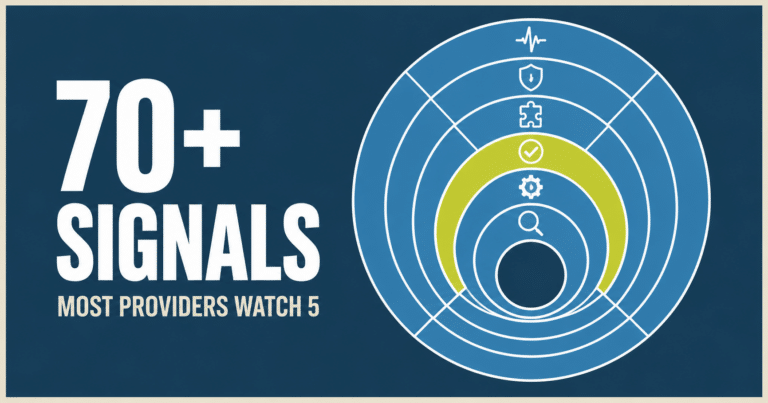
Think of a WordPress site as five layers, from the outside in. An attack has to get through each one to do damage, and each layer is usually looked after by someone different.
- The edgeA firewall and network in front of the site that filters traffic before it arrives.
- The serverThe hosting account: operating system, PHP version, file permissions, isolation from other accounts, backups.
- WordPress coreThe WordPress software itself.
- Plugins and themeAll the add-on code that gives the site its features and look.
- People and loginsEveryone with an account, their passwords, and what they are allowed to do.
WordPress itself is the strongest layer
WordPress core is the most secure part of a typical site. It has a dedicated security team, and since 2013 minor security releases install automatically on most sites. According to Patchstack, only 6 of the 11,334 WordPress security flaws found in 2025 were in WordPress core, and all 6 were low priority.
That is why “Is WordPress secure?” has a simple answer: the software is. The trouble starts with everything added to it. We cover the numbers in detail in is WordPress secure? the real security issues.
The plugin landscape is where the risk lives
Plugins are what make WordPress so flexible, and they are where 91% of WordPress security flaws were found in 2025. A few things make the plugin layer hard to keep safe:
- There are a lot of them. The official directory alone lists tens of thousands of free plugins, written by everyone from large companies to a single developer in their spare time. Quality and security practices vary enormously.
- Some are abandoned. When a developer stops maintaining a plugin, its flaws never get fixed. Patchstack found that 46% of the flaws disclosed in 2025 had no fix available when they were made public. See what abandoned plugins are and why they matter.
- Premium plugins hide in other places. Paid plugins and the extras bundled with premium themes often update outside the normal dashboard, so they fall behind without anyone noticing.
- Pirated “nulled” plugins are a trap. Free copies of paid plugins from unofficial sites are a common way malware gets installed on purpose.
- More code is now written by AI. Veracode’s 2025 study found security flaws in 45% of AI-generated code. A plugin or snippet can work perfectly and still leave a door open.
And the security plugin that is supposed to watch all this is often missing. On sites that come to us from other providers, we rarely find any security plugin installed at all.
The server side
Under WordPress is the hosting account, and it has its own security jobs that WordPress cannot do for itself:
- A supported PHP version. PHP, the language WordPress runs on, stops getting security fixes a few years after each release. A site on an old version runs on code that no longer gets patched.
- Isolation. On shared hosting, one hacked site should not be able to reach another. How well that separation works varies from host to host, and from plan to plan.
- File permissions. Files that anyone on the server can change are an open invitation.
- A server firewall and malware scanning. Many hosts run these, but they are built for general server attacks, not WordPress plugin flaws (more on that below).
- Backups that actually work. Backups are part of security, because they are how you recover when everything else fails.
That last point deserves emphasis. Host backups fail more often than most owners realize. We have seen enough of them fail that when we move a site, we make our own backup first instead of relying on the host’s.
What we found when one site moved over
A membership organization came to us from a large shared host. On paper, the site was protected. In practice:
- Its backups had never once left the server. The cloud storage they were meant to go to had never been connected, every backup run had failed without any warning, and 4.5 GB of failed backup files were filling the hosting account.
- The only security plugin on the site was one we had installed for them a year or two earlier. Its firewall was running in basic mode, with login rate limiting turned off.
- An old website from the early 2000s was still sitting in the public web folder, including an export of member data that anyone could have downloaded.
- The host’s own add-on plugin was causing fatal errors on the site.
None of this was visible from the front of the site. It looked fine, which is exactly why nobody had looked.
What hosts do, and do not, protect
Most hosts do a good job with the server: hardware, the operating system, the network, and blocking generic attacks. What they usually do not cover is WordPress itself, the plugins and theme on top of it, or who can log in.
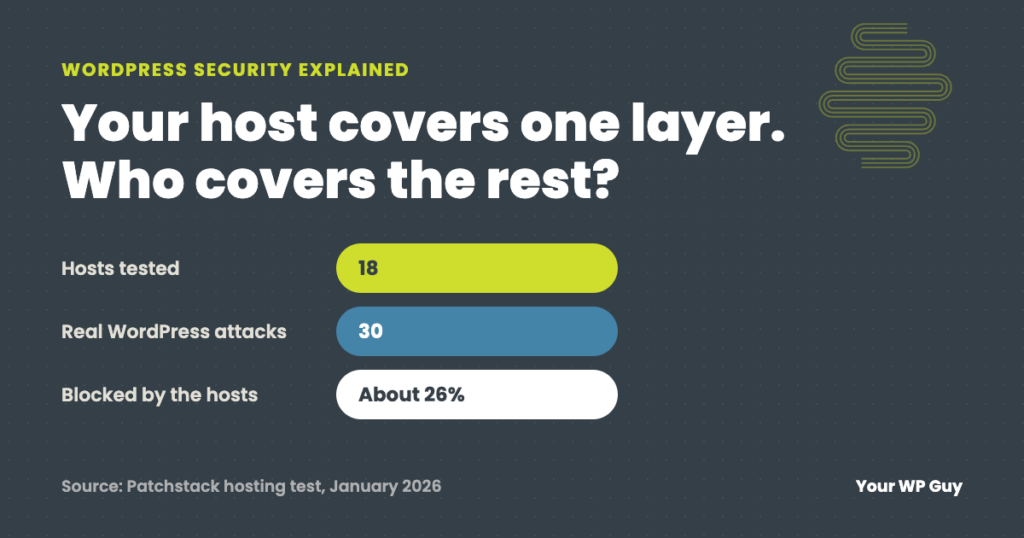
The clearest evidence comes from Patchstack, which tested 18 hosting providers in January 2026 by running 30 real, known WordPress attacks against stock sites on each. The hosts’ defenses blocked about 26% of the attempts. Roughly 74% got through. Attacks aimed at WordPress-specific flaws were the least likely to be blocked, and attempts to give an attacker administrator rights were stopped only 12% of the time.
| Patchstack hosting test (January 2026) | Result |
|---|---|
| Hosting providers tested | 18 |
| Known WordPress attacks used | 30 |
| Attempts blocked by the hosts | About 26% |
| Attempts to gain admin rights blocked | 12% |
| Least-blocked type | WordPress-specific flaws |
Patchstack ran this test itself and sells protection for this layer, and it describes the experiment as limited: simple attacks against stock sites, with host names withheld. An earlier, smaller Patchstack test (5 hosts, 11 attacks) found 87.8% of attacks got past hosting defenses.
The reason is not that hosts are careless. A server firewall sees web traffic, not what a particular plugin does with it. A request that exploits a flaw in a form plugin can look perfectly normal to the server. Catching it takes protection that understands WordPress, plus the update that closes the flaw.
Rather have every layer covered?
We look after the layers a host leaves open, whether your site is on our server or the host you already have. Here is how it works:
- Talk to a WordPress expertTell us where your site is hosted and what it runs.
- We check every layerPlugins, logins, backups and the server settings we can see, with our own backup made first.
- We watch it every dayUpdates, a firewall, scanning and alerts, checked by a person, and if a site on a plan is ever hacked, the cleanup is free.
How the layers work together
No single layer is enough, because each one is blind to something. The edge cannot see inside WordPress. The server cannot tell a harmful plugin request from a normal one. A security plugin cannot update other plugins or fix a failing backup. And none of them help if an administrator’s password was reused and leaked.
So the real question for any site is: who is responsible for each layer, and is anyone actually doing it?
| Layer | Usually handled by | Often missed |
|---|---|---|
| The edge | A CDN or firewall service, if one is set up | Not set up at all, or set up but not actually routing traffic |
| The server | The host | Old PHP versions, backups nobody has tested |
| WordPress core | WordPress, with automatic minor updates | Major updates left for months |
| Plugins and theme | The site owner, or nobody | Updates, abandoned plugins, no security plugin |
| People and logins | The site owner | Reused passwords, no two-factor, old accounts left active |
Notice the pattern: the layers where attacks most often succeed are the ones that usually belong to the owner, or to nobody. That is the gap a care plan fills. For the plugin layer specifically, see the WordPress security plugins we use and compare.
Questions to ask your host (including us)
These questions tell you quickly which layers are covered and which are yours:
- Do you protect against WordPress plugin flaws, or only server attacks? If the answer is “we have a firewall,” ask whether it has rules for WordPress plugins.
- Where do backups go, how often, and when was a restore last tested? A backup stored on the same server, or never tested, is not much of a backup.
- Which PHP version is my site on, and who updates it?
- How are sites on my server kept separate from each other?
- Who updates WordPress, plugins and the theme, and who checks the site afterward?
- If my site is hacked, who cleans it up, and what does that cost?
A good host will answer these plainly. If some answers are “that is up to you,” now you know which layers need someone.
Not sure which layers your site has covered? Our free Uh Oh Score checks your site and shows what needs attention, with no sales call required.
Get my Uh Oh ScoreQuestions people ask
What is WordPress security?
WordPress security is everything that keeps a WordPress site from being broken into or misused: a firewall in front of the site, a secure server, an up-to-date WordPress core, maintained plugins and theme, and protected logins. It is a set of layers, not a single product.
Doesn’t my host keep my WordPress site secure?
Your host protects the server. Most hosts do not protect WordPress itself, your plugins or your logins, and an independent test found host defenses blocked only about 26% of real WordPress attacks. Ask your host which layers they cover.
Is managed WordPress hosting more secure?
Often, yes, because managed hosts usually handle WordPress updates and add WordPress-aware protection. But “managed” means different things at different hosts, so ask the questions above. Plugins, logins and backups still need checking.
Do I still need a security plugin if my host has a firewall?
Yes. A host firewall is built for server attacks. A WordPress security plugin watches what happens inside WordPress, like new admin accounts and changed files. They do different jobs.
Are host backups enough?
Not on their own. Host backups can fail without warning, may be stored on the same server, and are rarely tested. Keep your own backups off the server and test a restore now and then.
What is the weakest layer of WordPress security?
Plugins and logins. That is where 91% of flaws are found and where reused passwords let attackers walk in, and they are the layers most often left to the site owner.
Sources
- Patchstack, The myth of secure hosting (January 23, 2026): 18 hosts, 30 known WordPress attacks, 25.89% blocked, privilege escalation blocked 12% of the time.
- Patchstack, Hosting security tested: 5 hosts, 11 attacks, 87.8% bypassed hosting defenses.
- Patchstack, State of WordPress Security in 2026: 11,334 flaws in 2025, 91% plugins, 9% themes, 6 in core, 46% unpatched at disclosure.
- Veracode, 2025 GenAI Code Security Report: flaws in 45% of AI-generated code.
- WordPress Developer Resources, Hardening WordPress.
Keep your hardest-working employee safe
Every layer of your site has a job, and the dangerous ones are the jobs nobody owns. With our security services, a real person looks after the layers your host leaves open, every day, and if a site on a plan is ever hacked, the cleanup is free.

Jonathan Wofford is the founder of Your WP Guy, a WordPress care and maintenance service supporting 105+ active client sites. He and his team keep WordPress sites fast, secure, and running, so business owners can stay focused on their business instead of their website.