reCAPTCHA vs Turnstile: The Case Study of an Invisible Captcha Tax

- A marketing agency was running Google’s reCAPTCHA and Cloudflare Turnstile at the same time, because a migration between the two had never been finished. This is what a reCAPTCHA vs Turnstile comparison looks like when the numbers come from a real site instead of a marketing page.
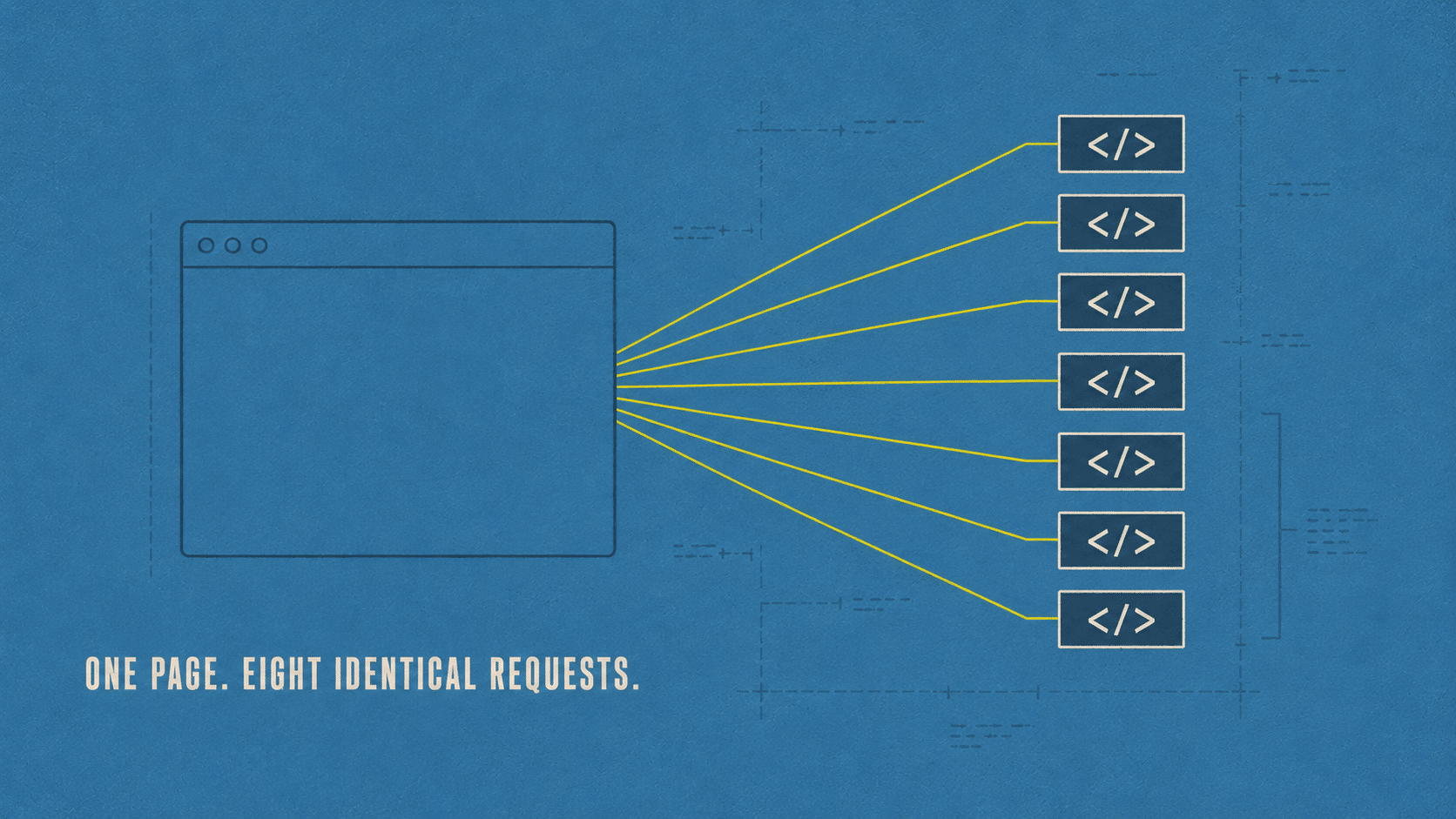
- The result: every visitor downloaded the full 332KB reCAPTCHA script eight or more times per page view. 3.6MB of duplicate code, on a site whose whole business is getting visitors through forms.
- We finished the migration across all 22 of the site’s forms in one pass, then kept auditing: a slow-loading hero image, eight oversized portfolio photos, and a three-layer cache stack that was quietly serving stale pages.
- Real payload per visitor dropped from about 9MB to about 4.8MB, a 47 percent cut, in two days.
- The lesson: the most expensive problems on a website are rarely broken things. They are almost-finished things.
- A Business Built on Forms, Taxed on Every One
- Why an Almost-Finished Migration Costs More Than an Unstarted One
- Finishing the Migration: All 22 Forms at Once
- How We Verify Before We Call Anything Done
- Then We Kept Going
- reCAPTCHA vs Turnstile: What Actually Changed
- What This Means for a Form-Driven Business
- Frequently Asked Questions
A Business Built on Forms, Taxed on Every One
This client is a marketing agency whose whole homepage runs on lead-generation forms: book a consultation, download a guide, register for a webinar, take an assessment. Every one of those paths runs through Gravity Forms. That is the business model, which is why they are on a Titanium care plan with us.
For a site like this, page speed is not an abstract metric on a report. It is the gap between a visitor filling out a form and a visitor closing the tab before the form even finishes loading. So when we sat down to run a full performance pass, forms were the first place we looked, not the last.
Which is exactly why what we found mattered so much. Every one of those forms was loading Google’s reCAPTCHA engine to keep spam out. Nothing wrong with that on its own. reCAPTCHA is a real, proven tool. The problem was not that the site used reCAPTCHA. The problem was that the browser was downloading the full 332KB engine over and over: eight or more times per page view. 3.6 megabytes of identical code, per visitor, per visit. More bytes than every image on the page combined.
Here is the twist. The fix was already sitting in the plugin list. Cloudflare Turnstile, the newer, lighter captcha alternative, was already installed, licensed, and configured with working API keys. Someone had started the migration and never finished it. The old system was never switched off, so both stacks stayed wired at once, and the heavier one kept loading on every single form. For how long? Nobody could say. There was no error message, no warning, no red light on any dashboard. The forms worked. The tax was invisible.
Why an Almost-Finished Migration Costs More Than an Unstarted One
A migration that is 95 percent complete looks, from the outside, like a finished project. The new tool is installed. The API keys are live. Somebody probably tested it once, saw it work, and moved on to the next task on the list.
But 95 percent complete is not the same as complete, and on a website, the gap between those two numbers is where the bill quietly accumulates. The old system does not know it has been replaced. It has no way of knowing to turn itself off. So it keeps running, in parallel, forever, until someone goes looking for exactly this kind of thing.
That is the pattern we see most often on sites that have been alive for a few years: not one dramatic failure, but a handful of almost-finished changes stacking up quietly over time.
Finishing the Migration: All 22 Forms at Once
Once we saw what was actually happening, the fix itself was straightforward, if not exactly small. We replaced the legacy reCAPTCHA field with a Turnstile field across all 22 of the site’s forms, in a single coordinated pass, with the full form configuration exported and backed up first in case anything needed to roll back.
Then we verified the way we always do: with live measurements, not assumptions.
- reCAPTCHA transfers dropped from 3,568KB to 0KB per page load.
- Every widget rendered correctly, with zero console errors.
- The agency’s own team submitted a real, end-to-end form themselves to confirm it before we called it done.
The result is modern protection, a lighter page, and a better experience for anyone filling out a form, all without changing a single word of the site’s actual content or design.
How We Verify Before We Call Anything Done
Every fix in this case study was checked against the live site, not assumed from a settings screen or a plugin’s dashboard summary.
A plugin telling you a migration is complete and a browser actually loading zero copies of the old script are two different claims. The first is a setting. The second is a measurement. We check the second one, every time, because it is the only one that reflects what a real visitor actually experiences.
That habit is also how the hero image, the portfolio photos, and the cache problem got found in the first place. None of those three were flagged by any plugin or dashboard warning. They only turned up because we went looking at what the browser was actually doing, page by page.
Then We Kept Going
Once you start looking closely at a site, you tend to find more than one thing. Three more turned up here, and all three shared the same shape: nothing was technically broken, they were just quietly leaking performance.
The Hero Image Nobody Preloaded
The homepage’s hero image was set as a Beaver Builder background, which meant it was invisible to the browser’s normal lazy-loading logic and discovered late in the load sequence. We preloaded it and converted it to WebP: 425KB down to 225KB, and visible sooner besides.
Eight Portfolio Images Stuck in PNG
Eight portfolio images were sitting on the site as heavyweight PNGs, totaling 2.1MB. The site’s own image optimizer had refused to touch them: a leftover technicality about missing backup files from years earlier. We converted them by hand, verified every one pixel for pixel against the original, and served them through a custom rule. Total size dropped from 2,112KB to 702KB.
A Cache Layer Nobody Knew Was Lying
The site’s caching turned out to run three layers deep: Cloudflare’s edge cache, WP Engine’s own layer, and a third caching plugin sitting on top of both, redundant and unnecessary. One of those three layers was quietly serving stale pages through the site’s normal clear cache action, the exact kind of thing that makes a site owner swear a fix did not work when it actually did. We mapped the stack honestly and documented a deploy procedure that clears all three layers, every time.
reCAPTCHA vs Turnstile: What Actually Changed
Laid side by side, the practical difference between the two systems on this site was not really about which company built them. It was about how much a visitor had to download before either one finished checking them.
| Google reCAPTCHA (legacy setup) | Cloudflare Turnstile | |
|---|---|---|
| Script weight per page load | 332KB, loaded 8+ times (3.6MB total) | Single lightweight widget |
| Visitor experience | Invisible until it is not; occasional challenge puzzles | Runs in the background, rarely visible |
| Network | Google’s own network | Cloudflare’s network, familiar if you already use Cloudflare for DNS |
| Setup on this site | 95 percent migrated, never finished | Fully live across all 22 forms |
Turnstile is not automatically the right call for every WordPress site. But for a site already inside Cloudflare’s ecosystem, with a legacy reCAPTCHA setup nobody has audited in a while, it is worth a look. Google’s own reCAPTCHA documentation and Cloudflare’s Turnstile documentation both lay out how each system actually works in more technical detail, if you want to compare them for your own site before deciding anything.
Where the reCAPTCHA vs Turnstile decision actually lands depends on what the site is doing. A high-volume marketing site like this one, where every page exists to funnel a visitor into a form, benefits most from Turnstile’s lighter footprint, since that weight gets carried on every single page. A checkout-heavy WooCommerce store leaning on reCAPTCHA’s fraud-scoring features for payment protection has a real reason to stay put, or to run both deliberately and verify neither is duplicated. A simple brochure site with one contact form rarely notices the difference either way.
What This Means for a Form-Driven Business
A form-driven business lives and dies by the seconds between a visitor arriving and a form actually being usable. This particular site was spending those seconds downloading the same security script eight times over, because of a migration that was 95 percent finished, which turned out to be functionally identical to a migration that never started.
Nothing about the site’s design, content, or forms changed in this process. Every form is still protected, better, in fact, since Turnstile is the newer of the two systems. The only thing that changed is how much weight a visitor has to carry before they can use the page.
That is the whole idea behind a Titanium care plan: not just watching for things that are visibly broken, but going looking for the almost-finished things nobody remembers to close out.
Want to know what your own site is silently charging your visitors? Our free Uh Oh Score scanner checks for exactly this kind of gap, no strings attached.
If you want to see what a similar audit turned up on a different site, our WordPress site speed audit case study found an 8MB problem hiding behind a passing plugin scan.
Not sure what your own site is silently downloading? Talk to a WordPress expert and find out.
Talk to a WordPress ExpertFrequently Asked Questions
What is a captcha tax and how do I know if my site has one?
A captcha tax is what we call it when a security or verification script loads more times than it needs to, usually because of leftover code from an old setup that was never fully removed. The easiest way to check your own site is to open your browser’s developer tools, load a page with a form on it, and look at the network tab for repeated requests to the same script.
Is Cloudflare Turnstile as secure as Google reCAPTCHA?
Both are built by major companies specifically to keep bots and spam off of websites, and both are actively maintained. Turnstile runs its checks in the background more often, which tends to mean fewer interruptions for real visitors, while still flagging automated traffic. Neither system is inherently more or less secure for a typical WordPress form, and a proper reCAPTCHA vs Turnstile comparison usually comes down to weight and visitor experience rather than security.
Will switching from reCAPTCHA to Turnstile break my existing forms?
Not if the migration is done and verified properly. Each form field needs to be swapped, tested with a real submission, and checked for console errors before anyone calls it finished. That verification step is exactly what got skipped in this case, which is what let the old and new systems run side by side for so long.
How much does duplicate script loading actually cost in page speed?
It depends on the script and how many times it repeats, but in this case a single 332KB file loading eight times added 3.6MB to every page view, more than every image on the page combined. On a slower connection, that is measured in real seconds, not milliseconds.
Why did not this get caught by a normal plugin scan or QA check?
Because nothing was actually broken. The forms worked, the site loaded, and there was no error message anywhere. A standard scan checks whether things are functioning, not whether they are functioning efficiently. Finding this kind of problem takes someone looking specifically for what is loading, not just whether it works.
Should every WordPress site switch from reCAPTCHA to Turnstile?
Not automatically. If your site already sits behind Cloudflare, or if you are troubleshooting a slow-loading form page, it is worth investigating as part of a reCAPTCHA vs Turnstile comparison for your own setup. If your current setup is clean, fully finished, and performing well, there is no need to change something that already works.
How do I check if my own site has a similar almost-finished migration problem?
Look for tools or plugins in your dashboard that seem to duplicate something you already have: two caching plugins, two security scripts, two versions of the same integration. Anything installed and configured but never confirmed as fully switched over is worth a second look.
Does Cloudflare Turnstile cost anything to use?
Turnstile is free to use on an unlimited number of sites and forms, the same way the free tier of Google reCAPTCHA is. Cost was never the deciding factor in this migration. The deciding factor was that one system was already fully paid for in bandwidth and never delivering, while the other was ready and idle.
What is Gravity Forms, and does this apply if I use a different form plugin?
Gravity Forms is one of the most widely used WordPress form builders, and it was the plugin in use on this site. The underlying problem, an unfinished captcha migration running two systems at once, is not specific to Gravity Forms. It can happen with any form plugin that integrates with a third-party captcha service, on any WordPress site.
How did the client discover this if their own uptime and analytics looked normal?
They did not, at first. Uptime monitoring and analytics both track whether a page loads and whether visitors arrive, not how much weight each visitor has to download to get there. In this case, the dashboard showed healthy traffic and normal bounce rates the entire time the duplicate script was loading. This kind of problem only shows up when someone measures actual transfer size directly, which is why it is a standard part of every performance pass we run.
Does finishing an old migration always save this much data?
Not always, but almost-finished projects are common enough that we check for them by default on every performance-focused visit. Some turn up nothing. This one turned up 3.6 megabytes of duplicate code on a site that had no idea it was there. The only way to know which kind of site you have is to look.
reCAPTCHA vs Turnstile: which is better for an e-commerce checkout?
For a checkout page specifically, the honest answer is that it depends on what you are protecting against. reCAPTCHA’s fraud-scoring options are built with payment risk in mind, so a store leaning on that feature has a real reason to keep it. If your checkout is only using a basic captcha challenge with no fraud scoring involved, Turnstile does the same job with far less weight added to a page where speed directly affects conversion.
reCAPTCHA vs Turnstile: does either one affect Core Web Vitals scores?
Yes, and this case study is a direct example of it. A bloated or duplicated captcha script adds to a page’s total transfer size and JavaScript execution time, both of which factor into Core Web Vitals. In this reCAPTCHA vs Turnstile comparison, removing 3.6MB of duplicate script was one of the single biggest contributors to the site’s overall speed improvement.