What Are WordPress Themes? (And How to Change One Safely)
A WordPress theme controls how your website looks: the layout, fonts, colors, header and footer. Plugins add features; the theme handles the design. Every site runs one active theme, and you can change it without losing your pages or posts, though some design settings will not carry over. See how we keep themes updated and safe.
You want your website to look professional, and every theme demo looks great. Then you install one, your pages look nothing like the demo, and you start to wonder what a theme actually does and what happens if you change it.
We maintain WordPress sites for small businesses every day, including theme updates, theme changes and the occasional theme that will not update at all. This guide explains what a theme is, how it differs from a plugin and a page builder, which kind your site uses, and how to change or update one without breaking anything.
What does a WordPress theme do?
A theme is a set of files that decides how your content is displayed. Your words, images, pages and posts live in the WordPress database; the theme decides where they sit on the screen and how they look on a phone.
Themes, plugins and page builders are easy to mix up, because many sites use all three:
| Piece | What it controls | Examples |
|---|---|---|
| Theme | The overall look: layout, fonts, colors, header, footer. Only one is active. | Twenty Twenty-Five, Astra |
| Plugin | Features: forms, backups, security, SEO, a store. Many can run at once. | Wordfence, UpdraftPlus |
| Page builder | Drag-and-drop design of individual pages, on top of the theme. | Beaver Builder, Elementor |
| Template | The layout for one type of page, such as a blog post or the home page. A theme contains many templates. | Single post, archive, 404 page |
For a closer look at the feature side, see our guide to what WordPress plugins are.
Block themes vs classic themes
There are two kinds of WordPress themes today, and they are edited in different places.
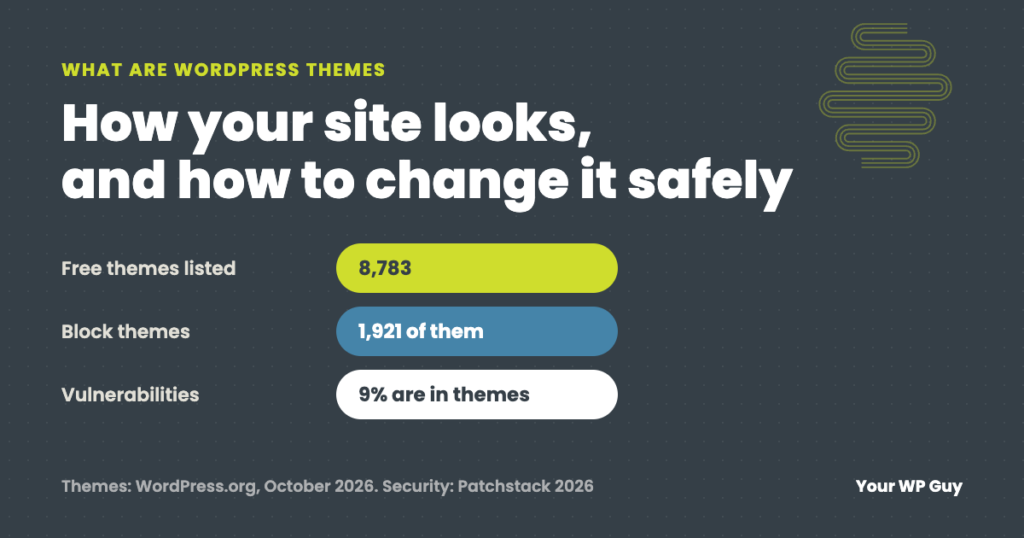
- Block themes are built entirely from blocks. You edit the header, footer and templates visually in the Site Editor. The default WordPress theme, Twenty Twenty-Five, is a block theme. 1,921 of the free themes on WordPress.org are block themes (October 2026).
- Classic themes use PHP template files. You change their settings in the Customizer, and many are paired with a page builder for page design.
To check which one you have, look at the Appearance menu in your dashboard. If you see Appearance > Editor, you are on a block theme. If you see Appearance > Customize, it is a classic theme. Neither is wrong; what matters is that it is kept updated.
Free vs premium themes
The official WordPress.org theme directory lists 8,783 free themes (October 2026), and every one is reviewed before it is listed. Premium themes are sold by their makers, usually with a yearly license.
| Compare | Free (WordPress.org) | Premium |
|---|---|---|
| Where updates come from | Your dashboard, automatically offered | The theme maker, while your license is active |
| Review before listing | Yes, by the WordPress theme team | Depends on the seller |
| Support | Community forum | The maker’s support desk |
| Bundled extras | Rare | Often bundles its own plugins, which can only be updated through the theme |
Avoid “nulled” themes: paid themes given away free on unofficial sites. They get no updates and often carry hidden code.
Are WordPress themes safe?
Themes from reputable makers are safe when they are kept updated. Most WordPress security problems start in plugins, but themes are not exempt: Patchstack found that 9% of the 11,334 new WordPress vulnerabilities reported in 2025 were in themes.
Two more numbers from the same report matter for themes. 46% of all those vulnerabilities had no fix from the developer when they were made public, and premium components had three times more vulnerabilities that were actually being exploited than free ones. Paying for a theme does not make it safer; keeping it updated does.
Simple ways to keep your theme from becoming the weak spot:
- Keep the active theme updated, along with any plugins bundled with it.
- Delete themes you do not use. An inactive theme can still be attacked. Keep one current default theme, such as Twenty Twenty-Five, as a fallback.
- Check when it was last updated before you choose a theme. Over a year without an update is a warning sign.
- Renew premium licenses, or plan to switch before the license lapses, because that is when updates stop.
How to change your WordPress theme safely
Changing a theme does not delete your pages, posts or images. What can change is everything the old theme was handling: menus and widget areas, theme-specific settings, shortcodes and custom styling. Plan for that before you click Activate:
- Back up the whole site first, files and database, and keep a copy off the server.
- Note what the old theme does: menus, widgets, the logo, custom CSS, and any features that came with it, like sliders or portfolio pages.
- Preview before you switch. Go to Appearance > Themes, hover over the new theme and click Live Preview. Better still, test on a staging copy of the site.
- Activate, then check the important pages on a phone and a computer: the home page, contact forms, and checkout if you sell online.
- Reassign menus and widgets, then keep the old theme installed for a week in case you need to switch back. After that, delete it.
How to update a theme without losing your changes
Theme updates replace the theme’s files. If someone edited those files directly, the update wipes the edits. That is what a child theme is for: a small theme that holds your custom changes and inherits everything else from the main (parent) theme, so the parent can be updated safely.
- Use a child theme for any code changes, or put small style changes in Appearance > Customize > Additional CSS (classic themes) or the Site Editor’s styles (block themes).
- Back up before every update, then check the site afterward, the same as a plugin update.
- Update bundled plugins together with the theme. A theme and the plugins it ships with are built to match; updating one without the other is a common cause of broken layouts.
Our step-by-step guide covers updates in full: how to update WordPress safely.
Rather not worry about theme updates?
Our plans update your theme and plugins every day, check the site afterward, and fix anything an update breaks.
- Talk to a WordPress expertWe look at your theme, what is bundled with it and what needs attention.
- We clean up and set upBackups, monitoring and security are in place within 24 hours.
- You stop worrying about updatesWe handle them and send a plain-English report each month.
A real example: the theme update button that could never work
An engineering firm we look after ran a premium theme that came with its own copy of a popular page builder. Their security scanner flagged the same thing every week: the page builder had a known security hole and an update was available.
Clicking Update would never have worked. The bundled copy had no license of its own, so WordPress could see the new version but had nothing to download. The theme’s latest release did not include a fixed copy either. We added a small server-side shield the same day that blocks the attack while letting the site’s real forms and video players through, and reported the problem to the theme maker.
Not sure how healthy your theme is? Our free Uh Oh Score checks your site and shows what to fix first, with no sales call required.
Get my Uh Oh ScoreQuestions people ask
Will I lose my content if I change my WordPress theme?
No. Pages, posts, images and users stay in the database. What can change is how they look, plus menus, widgets, theme settings and any features that came with the old theme. Back up first and preview the new theme before activating it.
What is the difference between a theme and a template?
A theme controls the look of the whole site. A template is the layout for one kind of page, such as a blog post or the home page. Every theme contains a set of templates.
How much does a WordPress theme cost?
Thousands are free in the official WordPress.org directory. Premium themes are sold by their makers, usually as a yearly license that covers updates and support. Check what happens to updates if you stop renewing.
What is a child theme?
A small theme that sits on top of a main (parent) theme and holds your custom changes. The parent can then be updated without wiping those changes.
Can I use two themes at once?
No. Only one theme is active at a time. A child theme works together with its parent, but you still activate just the child.
How do I find out which theme my site uses?
Log in and go to Appearance > Themes. The active theme is shown first. If you also see a child theme, the parent theme’s name appears in its details.
Sources
- WordPress.org, Theme Directory (counts checked October 2026).
- WordPress Developer Resources, Theme Handbook.
- Patchstack, State of WordPress Security in 2026.
Keep your website looking good and running safely
We update, check and clean up your WordPress theme and plugins every day, and fix anything an update breaks.

Jonathan Wofford is the founder of Your WP Guy, a WordPress care and maintenance service supporting 105+ active client sites. He and his team keep WordPress sites fast, secure, and running, so business owners can stay focused on their business instead of their website.