
WordPress Maintenance Plans
What Should a WordPress Maintenance Plan Include?
And What Should It Cost?
✔ 105+ Active Client Sites
✔ MarTech Best Website Maintenance Company in Georgia 2023 & 2024
Written by Jonathan Wofford, founder of Your WP Guy, who has worked with WordPress for 21+ years. Last updated October 2026.
The Short Answer
Five Things a Good Plan Covers Every Month
A good WordPress maintenance plan covers five things every month: updates that a person checks after they run, daily backups you can restore, security monitoring, a plain-English report, and someone who fixes what breaks. Plans that only automate updates often cost under $100 a month. Plans with a real person and fixes included usually run $100 to $300, and online stores cost more. Your WP Guy plans start at $119 a month.
Updates, Checked
Core, theme, and plugin updates applied, then a person checks the site afterward.
Daily Backups
A fresh copy of the site every day that can actually be restored.
Security Monitoring
Malware scanning, a firewall, and alerts when something looks wrong.
Plain-English Report
What was done this month, explained without the jargon.
Real Fixes
Someone who steps in when an update or plugin breaks something.
Plans are not all built the same. Here is what to look for, what to skip, and the questions to ask before you sign anything.
Maintenance Plan or Do It Yourself?
Honest answer: not every website needs a plan. Here is how to tell.
You can probably skip one if...
You need one if...
What a WordPress Maintenance Plan Should Include
Use this as a checklist when you compare plans, ours included.
| What to look for | Red flag | What good looks like |
|---|---|---|
| Updates | Updates run automatically and nobody looks at the site afterward | Core, theme, and plugin updates applied, then the site is checked to confirm nothing broke |
| Backups | Backups that have never been tested, or that only live on the same server | Daily backups, confirmed to exist, that can be restored on request |
| Security | Security means a plugin was installed once | Malware scanning, a firewall, and alerts when something looks wrong |
| Monitoring | You find out the site is down from a customer | Uptime, attacks, and plugin changes watched around the clock |
| Fixes | Every fix is billed by the hour on top of the plan | A person fixes what an update breaks, inside the plan |
| Reporting | No report, or a wall of numbers nobody explains | A monthly health report in plain English |
| A person to call | A ticket queue and a different stranger every time | Someone who knows your site and picks up the phone |
| Contract | A long commitment to get the advertised price | Month to month, cancel anytime |
| What to look for | Red flag | What good looks like |
|---|---|---|
| Updates | Updates run automatically and nobody looks at the site afterward | Core, theme, and plugin updates applied, then the site is checked to confirm nothing broke |
| Backups | Backups that have never been tested, or that only live on the same server | Daily backups, confirmed to exist, that can be restored on request |
| Security | Security means a plugin was installed once | Malware scanning, a firewall, and alerts when something looks wrong |
| Monitoring | You find out the site is down from a customer | Uptime, attacks, and plugin changes watched around the clock |
| Fixes | Every fix is billed by the hour on top of the plan | A person fixes what an update breaks, inside the plan |
| Reporting | No report, or a wall of numbers nobody explains | A monthly health report in plain English |
| A person to call | A ticket queue and a different stranger every time | Someone who knows your site and picks up the phone |
| Contract | A long commitment to get the advertised price | Month to month, cancel anytime |
Every Your WP Guy plan covers updates checked by a person, daily backups, malware and firewall protection, 70+ monitoring signals, and a monthly report. Fixes and phone support start at Platinum.
What a WordPress Maintenance Plan Costs
Prices vary because plans cover very different amounts of work. Most fall into three bands:
Under $100 a month: updates and backups, usually automated. Fair value if you are able to fix problems yourself.
$100 to $300 a month: updates checked by a person, security, monitoring, and fixes or support time included. This is where most small businesses land.
$300 and up: online stores, membership sites, and sites that need more hands-on hours every month.
Where we fit: Gold is $119 a month, Platinum is $249, and Titanium is $449 for stores where a broken checkout means lost sales. The price you sign up for is the price you pay next year too.
Want the bigger picture, including hosting, domains, and doing it yourself? See our guide to website maintenance costs.
What Most Maintenance Plans Do Not Cover
This is where surprise invoices come from. Read this part of any plan before you sign.
Redesigns and new features. Maintenance keeps the site you have healthy. A new layout, a booking system, or a rebuild is a project.
Content and page edits. Some plans include small edits and many do not. Ask how much time is included each month.
Hacked-site cleanup. Lower-priced plans often charge extra to clean up malware. Ask before you need it.
Bugs inside a plugin you bought. A provider can roll back or replace a broken plugin, but only its developer can fix its code.
On our plans, anything an update breaks is fixed on every plan. Platinum and Titanium add advanced troubleshooting and monthly support time, and work outside your plan is billed at a discounted rate.
What You Get Every Month
Every plan comes with two short reports each month, written in plain English.
Your Website Care Report shows what we did: updates applied, backups saved, security scans run, and anything that needs a decision from you. See what is in the monthly report
Your Opportunity Report shows a few ways your website could win more customers, like a page that is close to page one of Google or a page that gets visits but no calls. It is free with your plan, and you only pay for the work you choose. See a sample opportunity report
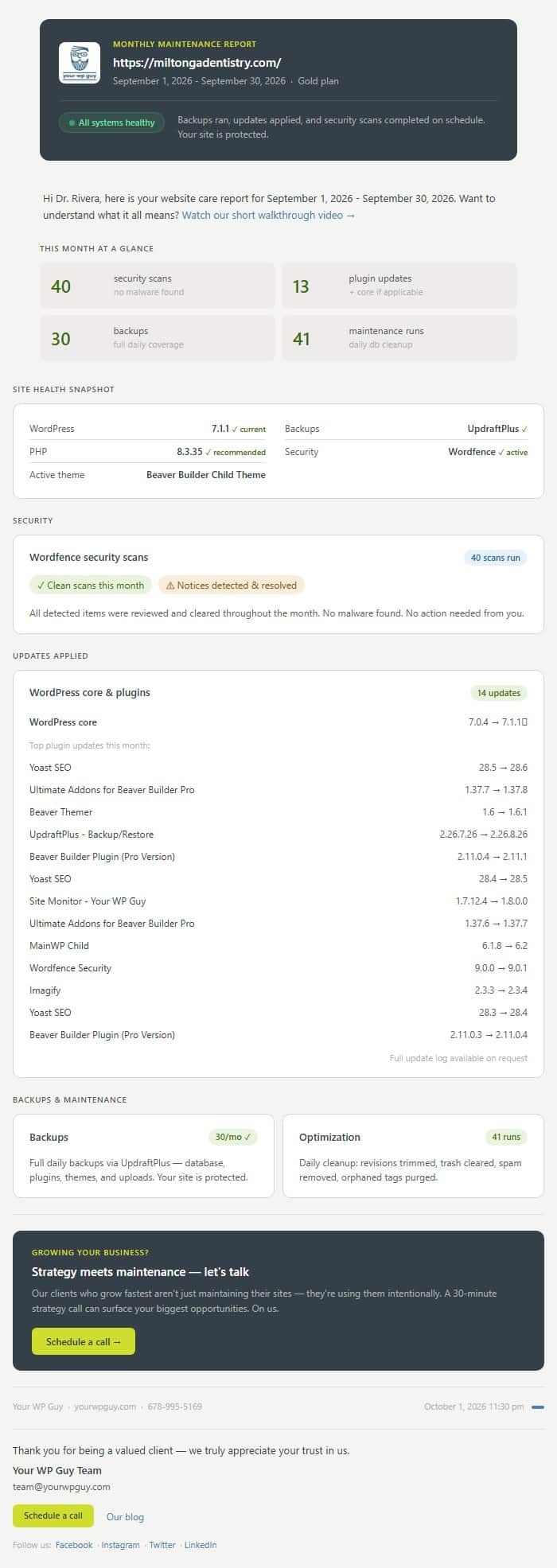

Sample reports for a demo dental practice.
Four Questions to Ask Any Maintenance Provider
Who Runs the Updates?
A person or a script? Automatic updates are fine until one breaks the checkout. Ask who looks at the site afterward. With us, a person applies and verifies updates on every plan.
What Happens When It Breaks?
Find out whether fixes are included or billed by the hour, and how you reach someone. On our plans, anything an update breaks is fixed on every plan, and Platinum and Titanium add other fixes and phone support.
Where Do Backups Live?
A backup nobody has checked is a guess. Ask how often backups run, where they are kept, and how fast one can be restored. We confirm daily backups actually exist.
Can You Leave Anytime?
A plan you cannot cancel does not have to keep earning your business. Ours are month to month, with no renewal jump.
What Clients Say
Jonathan is one heck of a guy! I love the way he operates Your WP Guy. They have just helped us so much.
Grant C.
Business Owner
Woohoo! Thank you Your WP Guy for making my website dreams come true!
Caylin B.
Business Owner
Thanks for your work on my website. You do a great job and respond quickly. It's nice to know that you're actually working on my website!
Kurt W.
Business Owner
WordPress Maintenance Plan FAQ
Want a Plan That Covers All of This?
Month to month, with no renewal jump.
- Updates checked by a person
- Daily backups confirmed
- 70+ signals watched
- Someone to call